# Overview
[DePINscan.io](https://depinscan.io/) provides a ready-to-use dashboard with essential visualizations tailored specifically for DePIN projects. It acts as a centralized hub catering to [**DePIN**](https://iotex.io/blog/what-are-decentralized-physical-infrastructure-networks-depin/) projects, enthusiasts, developers, founders and investors, ensuring they stay updated with sector developments.
There are 2 ways of integrating your DePIN project on DePINscan:
* [**Project Integration**](/developer/project-integration)
Anyone can submit their DePIN project to be integrated on DePINscan. Once created a project will be reviewed by an IoTeX team member for approval. Once approved the project will be live on the explorer.
* [**Map Integration**](/developer/map-integration)
The Map Integration requires a project to use the [DePINscan API](/developer/map-integration/using-the-api) to showcase their network's physical devices on the [DePINscan world map](https://depinscan.io/#map_view), granting more visibility and community engagement.
# Project Integration
Integrating your DePIN project into DePINscan grants you a lot of visibility within the DePIN community and allows your own community to stay up-to-date with your project's developments.
### Creating a new project
{% hint style="info" %}
**Is your project already on DePINscan? 🤔**
💡 If your project is already live and you don't have EDIT access to it, please create an account (instructions below), check your personal ID in your dashboard, and then reach out to an IoTeX team member to bind your personal ID with your project. This will allow you edit access so that you can keep your project profile up to date at all times.
{% endhint %}
In order to create a new project on DePINscan, you'll have to first sign in with your GitHub account or Google account from the `Developer` option in the navbar (as shown below).👇
Once signed in, you'll see your personal dashboard. Your dashboard will look pretty empty at the beginning, but no worries, we're here to take care of that! There are 2 important things to note on your dashboard (see image below):
1\) Your personal ID (which can be used, for example, to join a project, add team members to your project, etc..);
2\) The "Add project" feature, which is what we're going to explore next;
When adding a project, you'll be able to work on 3 tabs: "Config", "Tags", and "Social" (image below).
{% hint style="info" %}
Try to add as much information as possible, but no worries if some of these field are not relevant to your project quite yet, you can always go and edit later.
{% endhint %}
Once you've created your project, you'll see it on your dashboard. You can either edit it, or preview it. You'll also see that its status will be "pending". This means that one of the IoTeX team members is going to review your project for approval, or to maybe get some clarifications, or ask for some edits.
### Adding team members to your project
Collaborating on your DePINscan project is very easy. All you have to do is to select the "Team Members" option on the left nav bar in your dashboard, and simply add a team member using their username.
# Map Integration
The **DePINscan Location API**, a RESTful JSON endpoint, is specifically designed to enable DePIN Projects listed on [DePINScan.io](https://depinscan.io) to showcase their project's physical devices on the DePINscan world map.
{% hint style="info" %}
Remember that, in roder to proceed with the map integration, you'll have to first complete the previous section on [Project Integration](/developer/project-integration).
{% endhint %}
# Quickstart
For projects listed on DePINScan.io that feature physical devices or nodes, updating the geolocation of these devices on the DePINScan world map enhances visibility and functionality. This guide walks you through using the DePINScan Location API to achieve this.
## Acquiring an API key
#### 1. Login In to depinscan.io
Navigate to and log in using one of the supported ones (Metamask, GitHub, Google).
#### 2. Create an API Key
Within your dashboard, navigate to the "API" section and click on the "Create API key" button to generate a new API Key.
#### 3. Locate your project UID
Your project UID is located under the "Team projects" section in the DePINScan dashboard.
#### 4. API Testing
Utilize the official debugging tools available to test the API, which aids in quickly identifying and resolving API issues.
Access API Debug tools
API Debug tool
#### 4. Obtain API call parameters
After testing, click the "Copy curl code" button to copy the full parameters of your call.
Example `curl` command:
```sh
curl -X POST "https://api.depinscan.io/api/upload-device-metrics" -H "Content-Type: application/json" -H "Authorization: mc.6c...17785ca" -d '{
"uid": "47...5d",
"events": [
{
"custom": {
"longitude": 90.2,
"latitude": 22
},
"publisher": "device-id"
}
]
}'
```
#### 5. Previewing your data
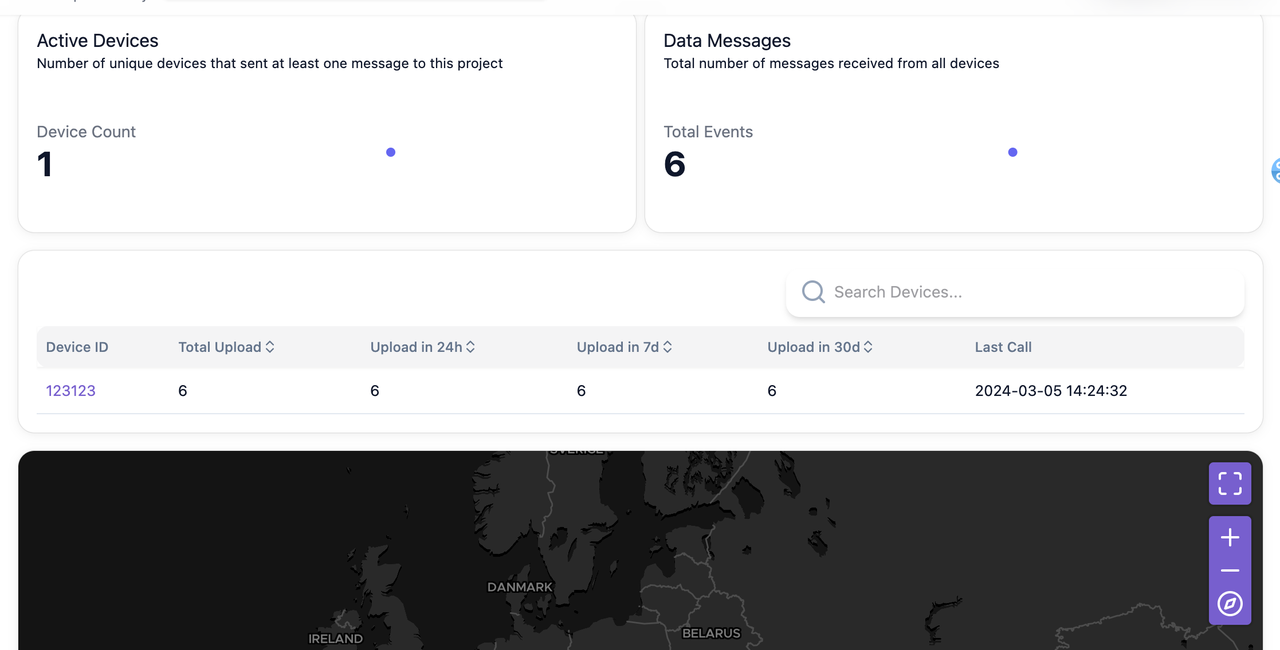
After uploading data, visit your project's preview page to view all uploaded data points. Note that it may take up to 2 minutes for the data to appear on the page.
Access your project's preview page
Project Prview
{% hint style="info" %}
Please note that it takes about 2 minutes for the data to be uploaded before it can be displayed on the page
{% endhint %}
# Using the API
You can use any programming language capable of making HTTP requests to interact with the DePINScan API.
* Direct all requests to `https://api.depinscan.io`.
* You can supply your API Key in REST API calls via the "`authentication`" header.
{% hint style="warning" %}
**Security Warning**
It's crucial to secure your API Key against public access to prevent unauthorized use.
{% endhint %}
# Endpoints Overview
DePINscan currently provides the following API endpoints:
{% openapi src="/files/UHwrY25vvJ5Uwx5kqQGq" path="/api/upload-device-metrics" method="post" expanded="false" %}
[depinscan.api.json](https://4046782323-files.gitbook.io/~/files/v0/b/gitbook-x-prod.appspot.com/o/spaces%2F0m2ip6ggBs3GSiSljRjr%2Fuploads%2FoWCe2h2ODHqXsFZoNSCo%2Fdepinscan.api.json?alt=media\&token=11486691-40e6-4c21-8b4e-36134ec819c3)
{% endopenapi %}
{% openapi src="/files/wbGPtOA3aFreYgrkVZQu" path="/api/project/{uid}/publishers" method="get" %}
[depinscan.api.json](https://4046782323-files.gitbook.io/~/files/v0/b/gitbook-x-prod.appspot.com/o/spaces%2F0m2ip6ggBs3GSiSljRjr%2Fuploads%2FCIAus4Zc241bIn2pJx31%2Fdepinscan.api.json?alt=media\&token=c42c0c4c-f49d-4299-92bb-59b5c6a3b251)
{% endopenapi %}
{% openapi src="/files/wbGPtOA3aFreYgrkVZQu" path="/api/delete-all-devices" method="delete" %}
[depinscan.api.json](https://4046782323-files.gitbook.io/~/files/v0/b/gitbook-x-prod.appspot.com/o/spaces%2F0m2ip6ggBs3GSiSljRjr%2Fuploads%2FCIAus4Zc241bIn2pJx31%2Fdepinscan.api.json?alt=media\&token=c42c0c4c-f49d-4299-92bb-59b5c6a3b251)
{% endopenapi %}
{% hint style="danger" %}
Please use the DELETE method with caution, as it currently deletes ALL devices from your project. This action is not reversible!
{% endhint %}
# Example Call
An example `curl` command for uploading data is shown below.
In your API requests, the fields `events`, `custom` and `publisher` are required. Incorrect or missing fields will result in a 400 error.
# ioID Integration
DePINscan supports [ioID](https://docs.iotex.io/ioid), IoTeX’s decentralized identity framework for machines and devices. By integrating ioID, every device in your DePINscan project can be assigned a verifiable, on-chain identity (did:io:...) that is cryptographically bound to an ioID NFT. This ensures that data and actions from your devices are provable, traceable, and interoperable across DePIN ecosystems.
This section of the documentation will guide you through the process of adding ioID to an existing [DePINscan](https://depinscan.io/) project directly from the DePINscan Dashboard UI.
With ioID in place, your DePINscan project gains:
* Secure device authentication → each device has a unique, tamper-proof identity.
* On-chain programmability → devices can be linked to token-bound accounts for payments, rewards, and automation.
* Interoperability → ioID-enabled devices can interact seamlessly across different DePIN protocols and ecosystems.
{% hint style="info" %}
ioID registry on DePINscan is free. Gas fees are required for regular on-chain operations
{% endhint %}
### Requirements
Before integrating ioID into your DePINscan project, make sure the following prerequisites are in place:
1. **An existing DePINscan project**
You’ll first need to have created a project in DePINscan. If you haven’t done so yet, follow the steps in the [Project Integration guide](/developer/project-integration).
2. **Devices registered via the DePINscan API**
Once your project is set up, you must register your devices with DePINscan by sending a request through the [DePINscan API](/developer/map-integration/using-the-api). This ensures that each device is recognized and ready to be assigned an ioID. You can also refer to the [Endpoints Overview](/developer/map-integration/endpoints-overview) section for more details on how to complete this step.
{% hint style="info" %}
With these two requirements in place, you’ll be ready to integrate ioID identities for your devices directly through the DePINscan UI.
{% endhint %}
# Step-by-step Integration
### Open your Project → go to the **ioID** tab
Make sure your DePINscan project already exists (see [Project Integration](/developer/project-integration)).
From the DePINscan dashboard, select your project and switch to the **ioID** tab.
On this page, choose one of two integration flows:
***
### Option A — Autopilot (IoTeX-managed)
Best when you want a zero-ops setup with no gas management on your side.
> **Note:** To unlock advanced ioID features (e.g., device-level permissions, automation, or token-bound account behavior), you’ll need to **transfer each device NFT to the device’s actual owner** once Autopilot completes.
***
### Option B — Manual (Builder-managed)
Choose this if you want to control the ioID and user binding process manually.
#### 1. Create or Import your Device NFT contract
You have two ways to set the contract used to represent devices:
* **Create from Template:**\
Use the built-in “Use Template” flow to deploy a standard Device NFT on IoTeX mainnet.
Please refer to this [template reference contract](https://github.com/iotexproject/ioID-v2-contracts/blob/master/src/deviceNFT/DeviceNFTTemplate.sol) for more details.
*
```
```
* **Import Existing Contract:**\
If you already issue device NFTs to owners, import your contract by address.
{% hint style="info" %}
**NOTE**: This option is currently supported on IoTeX, Ethereum and Polygon
{% endhint %}
***
#### 2. Send Device Ownership via API
Once your Device NFT contract is set:
* Use the [ioID API](/developer/ioid-integration/example-call) to **submit device ownership metadata** (mapping each device to its owner).
{% hint style="info" %}
Please go to the [Example Call](/developer/map-integration/example-call) page for more details
{% endhint %}
# Endpoints Overview
## Bind current owner wallet address to a publisher
> Associates a given owner wallet address with a publisher within a specific project.
```json
{"openapi":"3.0.3","info":{"title":"DePINscan Map Integration API","version":"1.0.0"},"servers":[{"url":"https://api.example.com","description":"Production server"}],"security":[{"bearerAuth":[]}],"components":{"securitySchemes":{"bearerAuth":{"type":"http","scheme":"bearer","bearerFormat":"YOUR_SECRET_TOKEN"}}},"paths":{"/api/project/{uid}/ownership":{"post":{"summary":"Bind current owner wallet address to a publisher","description":"Associates a given owner wallet address with a publisher within a specific project.","parameters":[{"in":"path","name":"uid","required":true,"schema":{"type":"string"},"description":"Project ID"}],"requestBody":{"required":true,"content":{"application/json":{"schema":{"type":"object","required":["publisher","owner"],"properties":{"publisher":{"type":"string","description":"Unique identifier of the publisher"},"owner":{"type":"string","description":"Wallet address of the owner"}}}}}},"responses":{"200":{"description":"Ownership successfully bound","content":{"application/json":{"schema":{"type":"object","properties":{"message":{"type":"string"},"publisher":{"type":"string"},"owner":{"type":"string"}}}}}},"400":{"description":"Invalid input (e.g., malformed wallet address)"},"401":{"description":"Unauthorized (missing/invalid token)"},"404":{"description":"Project or publisher not found"}}}}}}
```
# Example Call
Here is an example of a `curl` command for uploading device ownership data. In your API requests, the `publisher` and `owner` fields are required.
{% hint style="warning" %}
If these fields are incorrect or missing, you will receive a 400 error.
{% endhint %}
* `publisher`: This should match the device used in the `/upload-device-metrics` API.
* `owner`: This should be the wallet address of the device owner where they receive rewards.
#### Example request:
```bash
curl -X POST 'https://api.depinscan.io/api/project/78a4c60c-**/ownership' \
-H 'Content-Type: application/json' \
-H 'Authorization: mc.' \
-d '{
"publisher": "device_1",
"owner": "0x1234567890abcdef1234567890abcdef12345678"
}'
```
# Map Embedding
[DePINscan](https://depinscan.io/) offers a map widget that allows any DePIN project to embed a total or project-specific map view into their website.
### iFrame Generator
An IFrame (Inline Frame) is a HTML element installed inside another HTML archive on a site. The iFrame HTML component is regularly used to embed content from another source, like the DePINscan map in this case, into a site. There are many iFrame Generator services that allow you to embed a map in your site, so you're free to choose your favorite one.
{% hint style="info" %}
There are **2 types of URL** that you can use to embed the DePINscan map in your site, depending on your use case.
🎯 You can either use a project-specifc URL: \_\*\*;
🌍 Or a general map view URL: ******
{% endhint %}
For those who aren't quite familiar with any iFrame Generator services, we recommend:
1\) [Code Beautify](https://codebeautify.org/html-iframe-generator) is a super easy to use iFrame Generator, and gets you up and running in a matter of seconds. All you have to do is paste one of the URLs above and it'll will automatically show you a preview and give you the corresponding HTML code snippet.
2\)[ iFrame Generator](https://iframe-generator.org/) is another free service and it works in the exact same way.
All that's left for you to do now is to embed the DePINscan map on your site!
# Reporting Issues
The [IoTeX Community Forum](https://community.iotex.io/) has a whole section dedicated to [DePIN Developers](https://community.iotex.io/c/depin-developers/87/none). Within this section, choose the [DePINscan category](https://community.iotex.io/c/depin-developers/depinscan-io/90) and create a new topic with the issue you're facing, or the bug you found to kick off a conversation.
{% hint style="info" %}
Try being as descriptive as you can with your issue, including screenshots, images and possibly steps to replicate it.
{% endhint %}
Our team is constantly monitoring the community forum, so expect an answer shortly after filing your topic.
{% hint style="info" %}
It could be worth browsing through some topics that seem similar to yours, as someone else might have already resolved your issue.
{% endhint %}
# DePINscan Learn-to-Earn: User Guide
### 🧠 DePINscan Learn-to-Earn: User Guide
Earn crypto by learning about cutting-edge DePIN and Physical AI projects like IoTeX. Follow the steps below to unlock rewards.
***
#### 🚀 Step 1: Connect Your Wallet
Start by visiting the [DePINscan](https://depinscan.io) platform and clicking **Sign in** or **Start the Quiz**.
* Choose your preferred wallet (MetaMask, Phantom, Keplr, etc.)
* Approve the wallet connection via your browser extension.
***
#### 📖 Step 2: Read the Project Overview
Explore the featured project’s summary — in this case, **IoTeX**, the backbone of DePIN and Physical AI.
* Understand the core technology
* Learn about its purpose, mission, and infrastructure
***
#### 📲 Step 3: Follow Social Channels
Click through and follow all the project’s social links to continue:
* IoTeX X (Twitter)
* Telegram
* Discord
* GitHub
* Website
***
#### 🧩 Step 4: Answer the Quiz Questions
Carefully answer all questions. You must get **100% correct** to receive rewards. Questions are based on the project overview.
* You only get one attempt per quiz session.
***
#### ✅ Step 5: Confirm Eligibility with ZK Pass
Once you pass, complete the **ZK Pass** (a one-time identity verification) to confirm eligibility for rewards.
***
#### 🎁 Step 6: Claim Your Tokens
After successfully completing the quiz:
* Visit the **IoTeX Hub:** [**https://hub.iotex.io/claim#earn**](https://hub.iotex.io/claim#earn)
* Navigate to **Claim Rewards**
* Wait for the **claim window** to open (dates are shown in advance)
* Click “Claim” to receive your tokens
📅 Example: Claim period for the IoTeX quiz starts **May 17, 2025**.
***
#### 🏆 You're All Set!
You’ve now:
* Learned about a project
* Completed social engagement
* Verified eligibility
* Earned tokens directly to your wallet
Stay tuned for more quizzes on **DePINscan** and grow your knowledge — and portfolio — one quiz at a time!
# DePINscan Learn-to-Earn: Token Claiming
Let’s dive in and walk you through the steps to claim your DePINscan Learn-to-Earn Token Rewards!
### **Important Claiming Guidelines**
1. **Automatic Token Calculation** – Your earned tokens have already been credited to your wallet address. You just need to go and claim them.
2. **zkPass Requirement** – To verify user authenticity, zkPass will be required.
3. **Desktop Recommended for Claiming** – Since zkPass is required, we recommend completing the claim process on a Desktop client for a smoother experience.
4. **Claiming Timeline & Smart Contract Lock** – **(READ CAREFULLY!) 🚨**
1. Will be clear on the claim page. Example: $IOTX Reward claim period: Tue, 27 May 2025 00:00:00 GMT - Sat, 07 Jun 2025 23:59:59 GMT
### **How to Claim Your** DePINscan Learn-to-Earn Token Rewards
Each step below is accompanied by a visual guide to make the process as seamless as possible. Follow these steps carefully to ensure a successful claim.
#### **1) Access the Claim Rewards Page**
#### First, visit
* Connect your **wallet** (make sure it's set to the **IoTeX Mainnet**).
* Authorize the transaction to proceed with the claim process.
#### **2) Claim Your Rewards**
To ensure authenticity and prevent fraudulent claims, **users will need to complete the zkPass verification** before claiming rewards.
⚠️ **Important Notes:**
* You can use **Binance or OKX accounts** for ZK verification.
* **Each ZK proof is valid for only one wallet address.** If you are claiming for multiple wallets, you will need to generate separate proofs for each one.
#### **3) Generate Your ZK Proof**
If you need to complete ZK verification, follow these steps:
* **Install the zkPass Plugin** – Click [**here**](https://chromewebstore.google.com/detail/zkpass-transgate/afkoofjocpbclhnldmmaphappihehpma?ref=iotex.io) to install the zkPass plugin.
* **Start the Proof Generation** – Once installed, click the **"Generate Proof"** button to begin the process.
* **Select Your Verification Method** – Choose Binance or OKX, then log in and allow the verification request in the pop-up window.
* **Wait for Verification** – zkPass verification may take some time, so please be patient. Once it’s complete, you can proceed to claim your rewards.
The claiming process is that simple! Follow the steps above, and you’ll have your DePINscan Learn-to-Earn rewards in no time. If you run into any issues or have questions, feel free to reach out to **IoTeX Support** on [**Discord**](https://discord.gg/iotex?ref=iotex.io)**,** [**Telegram**](https://t.me/IoTeXGroup?ref=iotex.io)**,** or via email at **.**
### **Put Your Rewards to Work – Stake & Multiply Your $IOTX!**
Now that you’ve successfully claimed your **$IOTX or other DePIN tokens**, why stop there? Instead of letting your tokens sit idle, you can **stake them to earn passive rewards and grow your holdings** with some of the best APRs available.🚀 **Here’s how you can maximize your earnings:**
* **Native Staking on IoTeX** – Earn an **average APR of 5.8%** by staking directly through [**stake.iotex.io**](https://stake.iotex.io/?ref=iotex.io).
* **Binance Staking** – Get up between 3.5 and 8.1**% APR** with a **90-day staking duration** on Binance. (Please note that values can be variable)
* **Gate Simple Earn** – Access flexible staking options with yields of **up to 10% APR** via [**Gate.io’s Simple Earn program**](https://www.gate.io/simple-earn?ref=iotex.io).
* **DePINscan Staking -** Earn 4% or greater APR by staking within DePINscan (select projects only. Ex. [**https://depinscan.io/projects/hivello**](https://depinscan.io/projects/hivello))
# Ownership
Manage device ownership for a project
## Set or update device ownership for a project
> Creates or updates the ownership mapping for a device within the specified project.
```json
{"openapi":"3.0.3","info":{"title":"DepinScan Ownership API","version":"1.0.0"},"tags":[{"name":"Ownership","description":"Manage device ownership for a project"}],"servers":[{"url":"https://api.depinscan.io","description":"Production"}],"security":[{"AuthorizationHeader":[]}],"components":{"securitySchemes":{"AuthorizationHeader":{"type":"apiKey","in":"header","name":"Authorization","description":"Pass your token in the `Authorization` header. Example: `mc.`\n"}},"schemas":{"OwnershipRequest":{"type":"object","required":["publisher","owner"],"properties":{"publisher":{"type":"string","description":"Device identifier or publisher ID"},"owner":{"type":"string","description":"Ethereum address of the device owner","pattern":"^0x[a-fA-F0-9]{40}$"}}},"OwnershipResponse":{"type":"object","description":"Generic success body (replace with real response once available)","properties":{"status":{"type":"string"},"message":{"type":"string"}}},"Error":{"type":"object","properties":{"error":{"type":"string"},"message":{"type":"string"}}}}},"paths":{"/api/project/{projectId}/ownership":{"post":{"tags":["Ownership"],"summary":"Set or update device ownership for a project","description":"Creates or updates the ownership mapping for a device within the specified project.","operationId":"createOrUpdateOwnership","parameters":[{"name":"projectId","in":"path","required":true,"description":"Project identifier (UUID)","schema":{"type":"string","format":"uuid"}}],"requestBody":{"required":true,"content":{"application/json":{"schema":{"$ref":"#/components/schemas/OwnershipRequest"}}}},"responses":{"200":{"description":"Ownership recorded","content":{"application/json":{"schema":{"$ref":"#/components/schemas/OwnershipResponse"}}}},"400":{"description":"Bad request (validation errors)","content":{"application/json":{"schema":{"$ref":"#/components/schemas/Error"}}}},"401":{"description":"Unauthorized (missing/invalid auth)","content":{"application/json":{"schema":{"$ref":"#/components/schemas/Error"}}}},"403":{"description":"Forbidden (insufficient permissions)","content":{"application/json":{"schema":{"$ref":"#/components/schemas/Error"}}}},"404":{"description":"Project not found","content":{"application/json":{"schema":{"$ref":"#/components/schemas/Error"}}}},"429":{"description":"Too many requests","content":{"application/json":{"schema":{"$ref":"#/components/schemas/Error"}}}},"500":{"description":"Server error","content":{"application/json":{"schema":{"$ref":"#/components/schemas/Error"}}}}}}}}}
```
# Models
## The OwnershipRequest object
```json
{"openapi":"3.0.3","info":{"title":"DepinScan Ownership API","version":"1.0.0"},"components":{"schemas":{"OwnershipRequest":{"type":"object","required":["publisher","owner"],"properties":{"publisher":{"type":"string","description":"Device identifier or publisher ID"},"owner":{"type":"string","description":"Ethereum address of the device owner","pattern":"^0x[a-fA-F0-9]{40}$"}}}}}}
```
## The OwnershipResponse object
```json
{"openapi":"3.0.3","info":{"title":"DepinScan Ownership API","version":"1.0.0"},"components":{"schemas":{"OwnershipResponse":{"type":"object","description":"Generic success body (replace with real response once available)","properties":{"status":{"type":"string"},"message":{"type":"string"}}}}}}
```
## The Error object
```json
{"openapi":"3.0.3","info":{"title":"DepinScan Ownership API","version":"1.0.0"},"components":{"schemas":{"Error":{"type":"object","properties":{"error":{"type":"string"},"message":{"type":"string"}}}}}}
```




.png?alt=media&token=472ae52a-b766-4cf2-aa6e-3158c2931a4b)


